Showing posts with label Boardwalk. Show all posts

Tuesday, September 15, 2015

Wheelsport Fantasy Flat Handlebar 2x10 Speed: Part 4 - Final Assembly and Comparison

Part 1: Original Bike Components
Part 2: Bike Disassembly and Component Weight
Part 3: Installation of New Components


Finally, this is the last part of the Wheelsport Fantasy 2x10 Speed Flat Handlebar bike upgrade! In the previous posts, the original bike components have been documented, and the stock bike disassembled. After that, the bike was rebuilt with a mixture of stock and new components.

In this post, I will finish up this bike upgrade, and compare it to the Dahon Boardwalk in terms of bike geometry.

Shimano 105 5700 10 Speed Crankset, 53/39T, taken from the Dahon MuEX
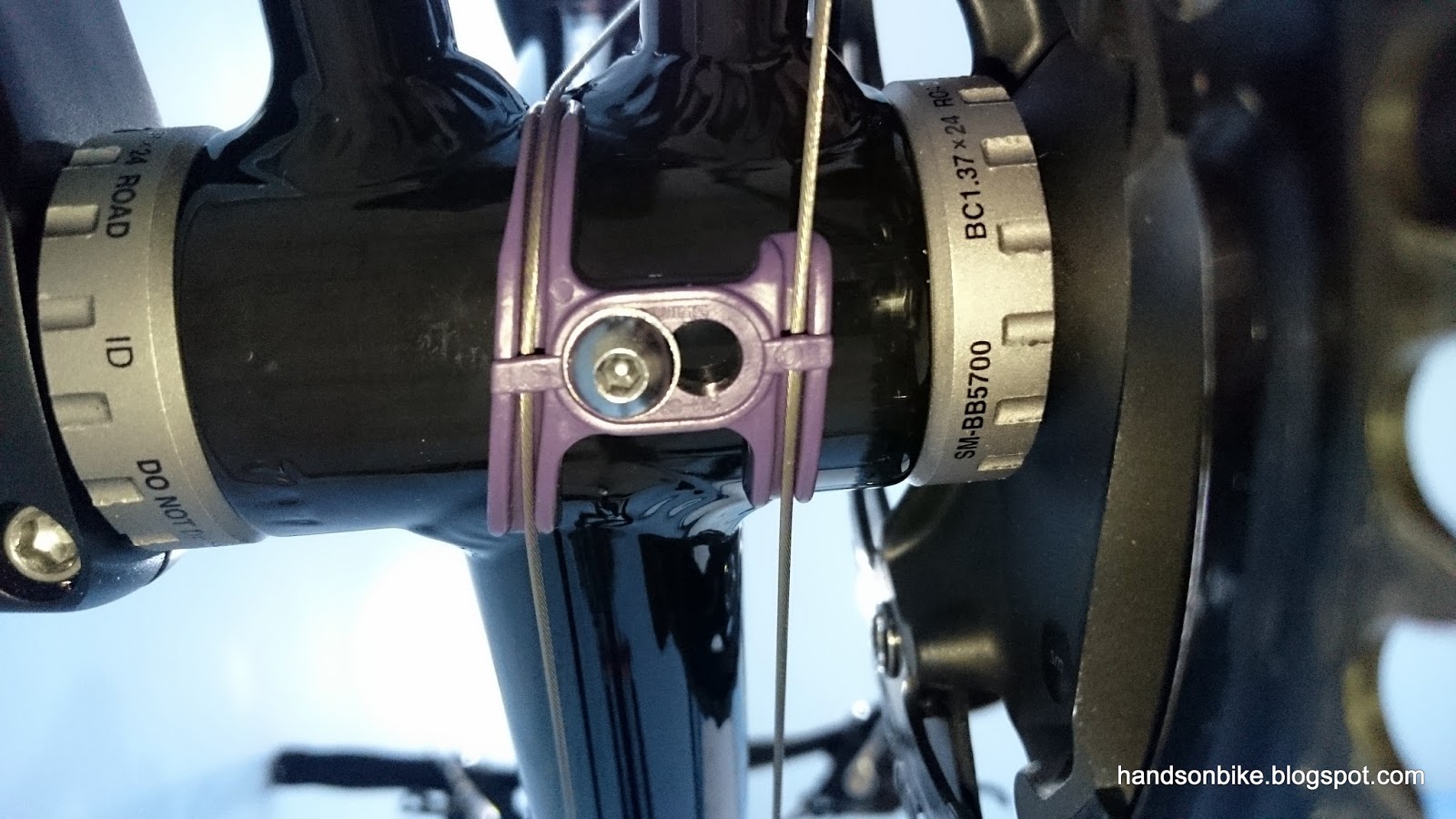
BB guide as shown mounted under the frame. The inner cable on the left leads upwards to the FD, while the inner cable on the right leads to the RD.

Rear shifter outer casing, shown here with a long nose end cap, to better protect the inner cable from wear and tear. Shimano 105 5700 10 Speed Rear Derailleur from the Dahon MuEX is used here.

Shimano 105 5700 Double FD as mounted onto the FD mount provided on the frame

With the full drivetrain mounted! All black to match well with the frame.

Gear range and ratios for this drivetrain setup, with 13 unique gears. 451 wheelset with 53/39T crankset and 12-30T cassette. This gear range should be good for any terrain.

Front brake calipers installed. Small clearance between tire and brake caliper, which means that wider tires (>25mm wide) cannot be used.

Rear brake calipers as installed on the bike. Once again, the small tire clearance limits the maximum tire size that can be used.

The length of the rear brake outer casing needs to be just right. Too short and it would stretch during braking, too long and there would be excessive friction.


Round 3M frame protection stickers have been pasted at strategic locations, to prevent the outer casing from rubbing away the paint on the frame.

With that, the upgrade from 1x9 speed to 2x10 speed is complete! Here is more info regarding the weight of the upgraded bike, and also some added accessories for the bike.

Full specs of the upgraded bike. Good weight of 8.8 kg without pedals! Just a little bit lighter than the original bike weight of 8.9 kg (excluding pedals and kickstand). This is despite adding around 300 grams with the addition of the front shifter, FD and cables.

The D-Light rear light fits perfectly on the seat tube, within the small triangle on the frame.

The D-Light front light also fits nicely on the handlepost, keeping the handlebar clutter-free. Mounted in a similar way to that on the Merida Scultura 5000.

Cateye Strada Wireless cycle computer mounted on the stem, in a very visible location

Side view of the upgraded bike

Looking pretty good!

With a folding handlepost, the handlebar can be folded down to make the bike really flat for storage, as seen here. This makes the bike a semi-folding bike?

When hanging the bike on the Minoura Bike Tower 10, the small frame does not really fit on the hooks properly

The front hook is OK, as it can grip the frame fully

However, the rear hook cannot hold the frame fully, as the frame top tube is too short. It will tend to touch the rear brake cable. Still, it is possible to hang the bike on this bike tower.

Lastly, the geometry of the Wheelsport Fantasy mini velo will be compared to the geometry of the Dahon Boardwalk. This will show the difference in geometry for this bike, as compared to the well established geometry of the Dahon folding bike. To compare the bikes, the BB is used as the datum and reference point. This means aligning the bikes such that the BB of the bikes are aligned beside each other.

The rear chainstay length of the bikes are slightly different. Dahon is 400mm, Wheelsport is 420mm. A longer chainstay contributes to a more stable bike at high speeds, but is also less agile.

Although the handlepost of the Wheelsport tilts much further backwards, unlike the vertical angle on the Dahon, the Wheelsport has a stem that brings the handlebar forward.

As seen here, the handlebar of the Wheelsport is located quite a bit higher and also rearwards. This creates a more upright riding position for the Wheelsport bike, which can be good or bad, depending on rider preference. Great for more leisurely rides, but not ideal for faster rides.

Side view of the bikes for comparison. Overall, the Dahon still has a longer wheelbase of 1020mm, while the Wheelsport mini velo has a wheelbase of 1000mm.

This upgrade is finally completed! I am glad to have had this chance to upgrade the Wheelsport Fantasy 2.0 mini velo, and I learnt quite a bit during the process. The bike has been nicely upgraded to a high performance 2x10 speed drivetrain, using mostly components taken from the Dahon MuEX (which has been upgraded to Ultegra/XTR Di2).

Wednesday, July 15, 2015

Journey of the Boardwalk: Part 43 - Shimano Di2 D-Fly Wireless Unit EWW01

When I ride my bike, I like to be able to know which gear I am currently riding in. For many new shifters, the optical gear display is no longer part of the shifter. The usual reason given is that the high end shifters are for the pros, and they don't need to know the selected gear. Rather, they judge by how hard they need to pedal, and change their gears accordingly.

That is true, but still, I like to know the gears, so that when I shift up or down, I know which gear I am in, and how many more gears are available. A couple of years ago, when I first installed the Ultegra 6770 Di2 system on my Dahon Boardwalk, I also installed the Alfine Di2 Digital Gear Display, which was great because it provided a nice and clear digital gear display.

However, in the recent upgrade to 11 speed Ultegra Di2, this Alfine gear display can no longer be used as it is not compatible with the other components in the setup. This means no gear display on the bike.

Luckily for me, there is actually a way to get gear display on the bike, and this requires some new add-ons to the Di2 system. Shimano has a new wireless unit, which is called D-Fly. What it does is to enable wireless transmission of Di2 gear and battery data, via ANT+ protocol. With a suitable ANT+ receiver such as the Garmin Edge 510, it would be able to receive and display the gear data from the Di2 system.

Di2 Wireless Unit for transmitting Di2 info wirelessly. Unfortunately it does not enable wireless shifting...

Very small sized, and only weighs about 5 grams.

One input and one output port. This D-Fly unit is designed to be installed in-line with the Di2 wires. This means you can install it between any two of your Di2 components.

It comes with a rubber strap to wrap the D-Fly unit around the chainstay, and it has two different rubber shims (with different curvature) to fit between the D-Fly unit and the frame.

As this D-Fly unit will be installed in between two existing components, this means that an extra Di2 wire is needed to complete the setup. Although it would allow quicker setup if the D-Fly unit comes with its own extra Di2 wire, the reason why it does not is because there is no way to determine what is a suitable Di2 wire length to include, as it depends on the frame type and the placement of the D-Fly unit. Better to let the user determine and purchase the correct length of Di2 wire separately.

Shimano recommends installing the D-Fly unit on the right side seat stay, in between Junction B and the Rear Derailleur. In actual fact, it can be installed practically anywhere in the Di2 system, in between two components. One thing to take note is that the D-Fly unit should not be installed internally in the frame, as the frame may block out too much of the wireless signal to make it usable. Again, this is not entirely impossible, just that it will take some experimentation for it to work.

I decided to get the shortest Di2 wire available, at only 150mm. The price is the same regardless of wire length.

As you can see, the wire is really very short. Useful to avoid too much slack wire hanging around.

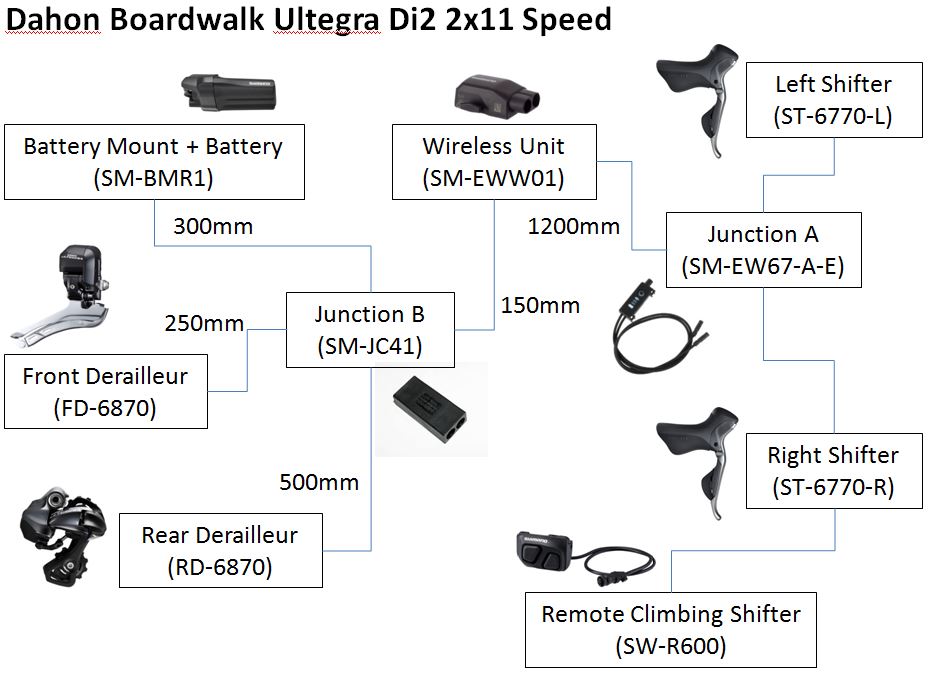
As shown below, here is a setup diagram of the 2x11 speed Ultegra Di2 system on the Dahon Boardwalk. With this graphical illustration, it should be very clear how this system is wired up. The wire lengths have also been included for reference.

Graphical representation of the Di2 wiring layout on the Dahon Boardwalk

After experimenting with a few mounting locations for the D-Fly unit, I have finally decided to mount it on the seat tube, beside Junction B as shown below. This way, it is less obtrusive and hides nicely along the frame.

Final mounting location of the D-Fly unit. Secured with a longer rubber strap as the original one is too short.

The D-Fly unit is located in between Junction A and Junction B. There is a long 1200mm wire from Junction A to D-Fly, and then a short 150mm wire from D-Fly to Junction B.

The short 150mm wire from the D-Fly unit leading into Junction B.

With the D-Fly unit connected and working properly, the gears can now be displayed on the Garmin Edge 510! Setting up the ANT+ connection was a little troublesome, but it is only a one time setup. Subsequently, the Garmin will automatically detect the Di2 data from the D-Fly unit once the first gear shift is made.

Gear display will be available when I select the Dahon bike profile, which is linked to the D-Fly unit.

The simple but great looking Di2 gear graphic found on the Garmin Edge 510. As shown above, the graphic represents the chainrings and the cassette on the bike. In this case, the selected gear is front low, and rear gear 6.

With this new D-Fly unit in the Di2 system, I have a digital gear display that I like. The gear display has essentially been incorporated into the Garmin unit, which allows the Di2 gears and the other parameters such as speed and distance to be displayed all on the same screen. This also saves space on the handlebar.

Other than showing the gear position, it also logs the selected gears with respect to time. This means that for cycling videos with Garmin data, it will be possible to display Di2 gears on the video overlay. Here is an example from another user.

Another small benefit is that the Di2 battery level can also be displayed, making it easy to check the battery level.

With this addition, the Di2 system upgrade is complete! 2x11 speed Ultegra Di2, with wireless gear display is definitely overkill on most bikes, especially for the humble Dahon Boardwalk. I am so glad to have had the chance to upgrade this bike for as far as this.

What's next?

Wednesday, July 8, 2015

Journey of the Boardwalk: Part 42 - Installing 11 Speed Ultegra Di2

It is now time to upgrade the Dahon Boardwalk to 11 speeds! As shown in the previous post, all the components for Ultegra 11 speed Di2 have been prepared and are now ready to be installed on the bike.

Before that, it is necessary to update all the firmware on the different components, so that they all have the latest firmware version in order to function properly as an 11 speed system. Also, we need to check the compatibility of all the different Di2 components. Although the E-Tube system has already allowed a wide variety of Di2 components to be used with each other, we still need to check compatibility. A compatibility table from Shimano has been provided below for checking of Di2 compatibility.

Compatibility table for a Road Di2 setup

As shown from the table above, I can only have one Junction A for the Di2 system. If you remember, for my current setup (10 speed Ultegra Di2), I actually have both the Ultegra 6770 Junction A (EW67) and the Alfine Di2 digital gear display (SC-S705) installed on the Dahon Boardwalk.

In the older firmware versions, this was an unofficial setup that just happened to work. Although it was sometimes buggy (display did not turn on sometimes), it worked pretty well as it gave a nice gear display. Under the latest firmware version, this would count as two Junction A and will not work.

For this 11 speed setup, I will need to update the firmware for the whole Di2 system. This would cause the old setup to stop working, as there will be two Junction A in the system. This means that I have to remove one of the Junction A.

Although the Alfine Di2 gear display is more useful, I have to use the EW67 Junction A as it has the two wires that are necessary to connect to the two road Di2 shifters. The Alfine Di2 gear display only has one input and one output and thus is not compatible with two Di2 shifters.

Current 10 speed Di2 setup, with the Alfine Di2 gear display mounted on the centre of the handlebar

Current setup, with the Garmin Edge 510 and Shimano Sport Camera mounted out front

Before I can update the firmware on the bike, I will need to wire up the entire system, so that I can update the whole system together. As I will continue to use the Ultegra 6770 Di2 shifters and the existing Di2 wiring which are already on the bike, this means that I will need to install the new 11 speed components onto the bike, before I update all the Di2 components at one go.

First, the old 10 speed Ultegra components are removed from the bike. This includes the 10 speed Ultegra 6770 Di2 RD, FD, chain and crankset.

RD, FD, chain and crankset removed from the bike

This Chris King R45 rear hub is 11 speed compatible, but because a 10 speed Shimano road cassette was installed, 2 spacers (1.85mm + 1mm) were on the freehub body.

The 11 speed Dura-Ace 9000 11-25T cassette will go straight onto the Chris King rear hub. No spacers required.

While installing the 11 speed Ultegra Di2 FD, I had an unexpected problem with the axle of the FD rubbing the LitePro FD adapter. This would sometimes prevent the FD from moving smoothly as the axle is too close to the adapter.

Axle of FD is rubbing against the FD adapter

I tried the FD adapter from another brand. Similar design, but it has just a little bit more clearance from the axle on the FD.

Ultegra Di2 FD installed onto the bike, with the new FD adapter. Small clearance between the axle on the FD and the adapter arm.

With the new 11 speed Ultegra Di2 RD and FD installed on the bike. After wiring up all the components, I can now update the firmware for the whole Di2 system.

Connected the Di2 system to the PC Linkage Device, which is then connected to the computer.

Before updating the individual components, the battery mount will automatically be updated first. For more information on updating the Di2 firmware, refer to this earlier post.

Next, the individual components will be identified, and those that need to be updated will be highlighted in yellow. Basically everything needs to be updated as it has been more than 2 years since I last updated the firmware.

All the Di2 components being updated one by one with the latest firmware

Glad to see that after all the updating is done, all the components are working normally! It is now possible to shift the new 11 speed Di2 RD and FD with the older Ultegra 6770 shifters. Another benefit of the new 11 speed Ultegra FD is that I can adjust the shifting stroke of the FD, similar to adjusting the cable tension of the FD inner cable. It was not possible to adjust this for the previous generation of Ultegra 6770 Di2 FD.

New Ultegra 6870 11 speed Di2 FD mounted on the bike. Looks much smaller than the previous Ultegra 6770 version! Wire exit is also nicely hidden at the rear.

Shiny new Ultegra 6870 11 speed Di2 RD. Also much smaller in size than the previous Ultegra 6770 10 speed version.

11 speed cassette, with a 11-25T cassette combination.

Ultegra 6800 compact crankset, 50/34T chainrings, taken from the Merida Scultura 5000.

A new 11 speed chain needs to be used for this new 11 speed drivetrain. The gear combination has also been changed from a largest combination of 53 front/27 rear to 50 front/25 rear, which means a shorter chain can be used.

The new Ultegra 6800/6870 drivetrain! With the 4 arm Ultegra crankset and the new 11 speed Ultegra Di2 RD and FD. Shifters are still the same Ultegra 6770 Di2 shifters, reprogrammed for 11 speed components.

Full view of the newly upgraded 11 speed Ultegra Di2 Dahon Boardwalk! 

It is great to finally complete upgrading the Dahon Boardwalk with the new 11 speed Ultegra Di2 components. Functionally speaking, there is no big difference in shifting performance between the 10 speed and the 11 speed Ultegra Di2 components.

However, from an aesthetic point of view, the smaller Ultegra 6870 RD and FD is a big difference from the bulky Ultegra 6770 RD and FD. Also, the 4 arm crankset gives a different image from the older 5 arm crankset design.

Most importantly, this latest upgrade frees up the 10 speed Ultegra 6770 RD and FD for another bike, another project!