Showing posts with label Garmin. Show all posts

Sunday, November 13, 2022

Focus Paralane: Garmin Rally XC200 Power Meter SPD Pedals

Recently I had the chance to test out a pair of Garmin Rally XC200 Power Meter SPD pedals. These are new power meter pedals from Garmin. What's cool about these pedals is the small size and the SPD compatibility.

Previous iterations of power meter pedals are usually rather large, and with a bulge at the pedal axle. For this version, Garmin has managed to shrink down all the electronics, such that it all fits inside the pedal axle! At the same time, the SPD platform is what I prefer, so that I can use it with my Shimano RX8 gravel shoes

I have previously been using one-sided crank based power meters, such as the 4iiii Dura-Ace or the 4iiii 105 versions. Being one-sided, it takes the power generated by the left leg, and multiplies it by two to give an estimate of your total power. This assumes that your power is equal on the left and right legs, which is usually not the case. If it is not equal, the total power will not be accurate. This is the case on the Focus Paralane, where the 4iiii 105 left crank arm is currently installed.

I decided to install the Garmin pedals on the Focus Paralane, since it is the bike I ride most often. Let's take a look and see how it compares to my existing pedals.

XTR M9120 Trail pedals, next to the Garmin Rally XC200. SPD mechanism looks similar.

Wednesday, July 15, 2020

Cervelo Aspero: PRO Vibe Garmin Mount and Headset Spacers

The Cervelo Aspero gravel bike has been fully assembled. But that does not mean that the upgrading or modification stops! Sometimes there are areas that needs to be improved or modified, as I am not satisfied with it.

I have a Garmin Edge 530 that I used on my Canyon Endurace, and I would continue to use it on this new Cervelo Aspero as well. I had thought that a standard Garmin mount will work on the PRO Vibe handlebar, since it is not an integrated handlebar like the one on the Canyon Endurace.

PRO Vibe Aero Superlight handlebar, mounted on the PRO Vibe stem.

Some of the Garmin mounts that I have accumulated over the years. 
From left to right: Beefy plastic mount from Edge 530. Older plastic mount from Edge 510. Aluminium K-Edge mount with GoPro attachment at the bottom.

However, none of the many mounts that I have fits on the PRO Vibe handlebar, as there is not enough width beside the stem to fix the clamps. This is due to the airfoil section on the handlebar which leaves very little round section for the clamps.

After doing some research, I found that a special narrow clamp is needed for this PRO Vibe Aero Superlight handlebar. This is kind of annoying as I was not expecting a special Garmin mount to be necessary. This leaves me with no choice but to get it even though it is expensive.

Special Garmin mount for use with the PRO Vibe handlebar. Made by K-Edge actually, which means K-Edge pricing. This is the regular size which is shorter, meant for smaller Garmin head units.

Made in 3 pieces instead of the old type which is completely machined from 1 piece. Less machining wastage I guess.

The clamp is fixed to the silver section via a rivet, while the front piece is bolted.

These two bolts are not designed to be removed.

Extensive chamfering and removal of material around the clamp, to avoid interference with the airfoil section of the handlebar.

Another view of the chamfering around the edges of the clamp. The clamp itself is extra narrow as well.

Weighs 31 grams, which is lighter than all the other Garmin mounts that I have.

The narrow clamp is needed to fit on the narrow section of the handlebars.

Chamfering on the inner edges of the clamp is needed to avoid interference with the airfoil shape of the handlebars.

Regular size mount suits the Edge 530 nicely. There is enough clearance between the bottom of the head unit and the face plate of the stem to press the buttons located at the bottom of the head unit.

The angle is more or less fixed at about horizontal, as the rivet head on the clamp needs to fit into a recess on the stem face plate.

With this special Garmin mount, I am finally able to use the Edge 530 on the Cervelo Aspero. Not a fan of proprietary parts whereby there are no alternative options.

Another area which I was not satisfied with was the spacers under the stem. I have some standard carbon spacers, which I used to stack 40 mm under the stem. This raises the stem to the proper height without needing to cut the steerer tube.

However, as you can see below, the outer diameter of the standard carbon spacers are bigger than the outer diameter of the stem clamp. The stem does not have a nice integrated look with the spacers, due to this size difference.

Standard carbon spacers used under the PRO Vibe stem.

Outer diameter of the carbon spacers are much bigger than the stem, causing this step and a mismatched appearance.

Functionally, there is no issue, of course, but I never had this big mismatch problem when I used other stems with similar carbon spacers. I guess the outer diameter of the PRO Vibe stem clamp is smaller than usual. Examples shown below.

Fabike C3 with Controltech stem. Small mismatch.

Java Freccia carbon mini velo, also with the same Controltech stem.

 Wheelsport Fantasy mini velo, with a Fizik Cyrano R1 stem.

Guess what, after doing some research, I found that there are special stem spacers that can be used with this PRO Vibe stem. Another proprietary part, although it is not compulsory. No harm trying it out to see how it works.

Spacer set to be used with the PRO Vibe stem.

A special spacer is needed on top of the stem, if you wish to add some spacers above the stem.

Special PRO Vibe aluminium spacers that goes under the stem. The teardrop shape is to match the stem clamp shape. The spacer walls are thinner compared to the carbon spacers.

To get a spacer stack height of 40 mm, I will use 15 + 15 + 10 mm spacers. Weighs 32 grams, which is a bit more than a 40 mm stack of carbon spacers (22 grams).

The outer diameter and teardrop shape of the spacers roughly match the stem. Not very integrated still, and I am not very pleased with the outcome.

Now, the bottom of the teardrop shaped spacers does not match with the round headset cover. Guess it is one or the other.

After all this fuss, the appearance is still not ideal, since the teardrop shaped spacers are not able to match the round headset cover. This is something which I overlooked. If I want to really improve this, what I need would be aluminium spacers with a smaller outer diameter (thinner walls) to match the PRO Vibe stem, and forget about the teardrop shaped spacers. However, I have already wasted enough time on this small issue and will just leave it as it is.

In all, the PRO Vibe Aero Superlight handlebar and PRO Vibe stem looks good and works well, but there are some proprietary designs and parts that makes it unique, not in a good way.

Downsides of the PRO Vibe Superlight handlebar:
1) Flattened curve area of drops, not as comfortable as a standard round section.
2) Airfoil shape prevents the use of standard Garmin mounts.

Downsides of the PRO Vibe Stem:
1) Requires special top cap that is included with the stem.
2) Does not look good with standard carbon spacers as the clamp walls are thin.
3) Special spacers, although optional, are needed if an integrated look is desired.
4) Requires special spacer on top of the stem, if you wish to put spacers above the stem. If this is used, the appearance becomes quite bad as the top cap will not be integrated with the stem.

Next time, I think I will just get a standard FSA handlebar and stem, as they work well, look good, cost less, and are lightweight too, with none of the proprietary parts and unique features.

Saturday, November 30, 2019

Garmin Edge 530

Recently, my old trusty Garmin Edge 510 cycle computer stopped working, as it could not be turned on at all. Besides, all the rubber bits on the Edge 510 were disintegrating. Seems like a good time to get a new cycle computer, since I already had the Edge 510 for more than 4 years. Warranty coverage has ended long ago, and it is probably not worth repairing an old electronic device, when I can get a new one with much more features and better performance for a good price.

I considered getting other brands of cycle computer, such as Lezyne, Wahoo, and other smaller brands. However, based on ease of use, and also my preference for the Garmin ecosystem, I decided to get another Garmin. Besides, I have so many Garmin mounts that will become useless if I change to another brand of cycle computer. I have good experiences with Garmin and so I don't really feel a need to try out another brand. In fact, I also wrote a more in depth review on the Edge 510.

The latest Edge 5XX series is this Edge 530, which has a lot more features that my previous Edge 510. Not that I will use all of them, but it is interesting to see what they offer nowadays.

The higher end Edge 830 or even Edge 1030 is much more expensive, and has too many features that I will not need to use. I also considered the cheaper Edge 130, but that one does not support Di2 integration, so it is disqualified from my point of view.

And that is how I ended up selecting the Edge 530 as it ticks all the correct boxes for me. This time, I decided to buy from the local bike shop to support them, instead of buying it online. There is a promotion going on, which gives a free sensor bundle (speed and cadence) when you buy the Edge 530 head unit.

I actually don't need the extra sensors, as I already have enough sensors, and I tried to get a discount instead of getting the sensors. However, that was not possible, and so now I have an extra set of sensors that I can attempt to use, or sell away.

Garmin Edge 530, with free speed and cadence sensor bundle.

Comes with various mounts and adapters, including the durable rubber bands.

Charging port (micro USB) is located at the bottom of the head unit. The Lap button is on the left, while the Start/Stop button is on the right.

On the left side of the head unit, the power button (red) is located near the top, while the Up/Down buttons are used to scroll through the menu.

On the right side of the head unit, the Back button is located near the bottom, while the Enter/OK button is located near the top.

For this Edge 530, physical buttons are used instead of touchscreen like on the Edge 510. There are advantages and disadvantages to both kinds of systems.

A touchscreen interface makes it easy to press the button that you want, but the on-screen buttons also takes up valuable space on the screen. The Edge 510 touchscreen interface seems to be pressure-based, which allows it to be used in rain or with gloves on, but the tactile feeling and sensitivity is poor. The touch feeling is nowhere like using a modern smartphone.

On the other hand, using physical buttons gives better tactile feeling, and the screen can display more items without the on-screen buttons taking up space. However, I need to remember where each button is and what it does, which is a bit tricky since they are all over the outside of the head unit where I cannot see the symbol molded on the buttons.

Comparing the old Edge 510 on the left to the new Edge 530 on the right. The screen technology looks totally different! Overall dimensions (length and width) are similar.

Edge 510 is slightly thicker than the new Edge 530.

When the Edge 530 is turned on, you can see the difference in screen size, even though the overall head unit dimensions are similar. Screen on the Edge 530 is much bigger and of higher resolution.

Edge 510 has the charging port at the back, covered by a rubber flap. The Edge 530 has metal contacts at the mount area, which allows it to be powered by a Garmin Charge Power Pack for super long battery life.

Edge 510 weighs 81 grams...

...while the Edge 530 is a tiny bit lighter at 78 grams.

Mounts without any problem on the Canyon Endurace. The big colour screen looks good! There is enough space between the head unit and the handlebar to operate the buttons at the bottom of the unit.

Testing out the sensors after linking them up to the Edge 530 head unit. Speed + cadence sensor working well, heart rate sensor from the Garmin Forerunner 235 working well, 4iiii Power Meter working well.

I am pleased with the new Garmin Edge 530 as everything is working perfectly. The screen display is big, clear and colourful, and the buttons are easy to operate, although I am still trying to remember the function of each button. Linking the head unit to all my sensors is no problem at all, the Garmin was able to detect all the sensors easily. Even linking the head unit to the Di2 system, to show the selected gear, is not an issue. I can still control the screen display of the head unit using the Di2 buttons on top of the Di2 road shifters.

Di2 gears clearly shown on the Garmin Edge 530 screen. 

My different activity modes for the different rides and bikes.

The head unit also starts up fast, much quicker than the Edge 510. GPS locking is fast as well. Battery life is also very good, compared to the Edge 510. I don't have any numbers to show how much faster the features work, or how much longer the battery lasts, but they are different enough that I can feel the improvement easily.

Sunday, September 16, 2018

Dahon MuSP: Assembly Begins

In the first post about this Dahon MuSP folding bike, one of the requirements was for a blue wheelset. The overall colour scheme for the bike is thus black with blue accents. Other than the blue Wheelsport Smart 1.0 wheelset, it will look nicer if I can find some blue bits to add some colour to the bike.

However, blue parts are hard to find! Most of the custom colours are red, silver, black or silver. Very few blue parts are available. I managed to find some blue Litepro chainring bolts, to use on the front single crankset.

For this bike, other than the blue wheelset and the blue chainring bolts, I wanted to change the seatpost clamp and the headset to blue colour. This would be similar in idea to how I wanted to add red colour to the Dahon MuEX last time.

There are only a few sources with blue parts on Taobao, and you will not know if they really have it in stock, until you actually order it. Therefore I just have to try my luck and place the order...

Blue seat post clamp is available! Looks very much like the Dahon design which is good.


Looks good on the black frame. Although it will look better if the logo is removed...

Blue headset shown in the top row, with the Litepro headset shown at the bottom row.

The blue headset is from some generic brand with no logo. The construction is of an older design, which has more parts as compared to the Litepro headset which is much simplified. The part that can actually be seen is only the blue headset cover, therefore I mixed and matched the two headset to get the best combination that matches both the frame and the fork.

With the blue headset cover installed! Good contrast with the black frame and handlepost.

Frame, fork and handlepost installed, along with the blue headset cover and seat post clamp.

At this point in time, I was actually still waiting for the blue Wheelsport wheelset to be available as it was out of stock, which is why I could not start some parts of the assembly yet. However, I could install some other parts that are not directly dependent on the wheelset.

Ultegra R8000 brake calipers installed at the rear of the frame, using the dedicated caliper brake mount.

The brake calipers are also installed on the front fork, also using the dedicated caliper brake mount.

Before installing all the components, it is a good idea to connect up the Di2 components to make sure they are working properly. This is especially important since the internal routing will make it more difficult to troubleshoot if something does not work.

Di2 wiring layout on the Dahon MuSP. Note that the wireless unit and Junction A are actually placed in between the left and right shifters, which is unconventional.

In this layout, the 1000mm, 150mm, 300mm, 700mm Di2 wires are fully internal routed, while the 1400mm Di2 wire is partially internal routed through the main frame. As shown below, the 1000mm Di2 wire, wireless unit and 150mm Di2 wire are fully hidden within the handlebar.

Full Di2 layout tested on actual components to check if they are working properly. No problem!

Shown here is the right side bar end. The 1000mm Di2 wire (peeping out from the handlebar) comes from the left side shifter, through the handlebar, and is connected to the wireless unit. The short 150mm Di2 wire will be connected to Junction A.

Before pushing the wireless unit into the handlebar, it is first wrapped in sponge to prevent rattling inside the handlebar. Might be difficult to get it out next time...

The 150mm Di2 wire is then connected to Junction A. The other 300mm Di2 wire will pass through the hole at the handlebar, and run along the outside of the handlebar, up to the right shifter.

Once again, connecting everything to make sure it is working properly. Remember to install the Controltech stem before you install the shifters!

At the same time, I also connected the Garmin Edge 510 to the Di2 system, to display the selected gear. It works fine!

Now I know that the handlebar area of the bike is working fine, the next step is to wire up the rest of the bike. More specifically, connecting the Di2 rear derailleur, battery and Junction B together, before linking up with the handlebar.

This part is quite challenging, as it also requires the internal routing kit to help pull the cables and wires through the frame. I started with the 700mm Di2 wire, which is the one that links the Di2 rear derailleur with Junction B, and is routed internally through the right side seat stay.

Routing this Di2 wire from the seat stay side should be easier, as the hole at the seat stay side is small, while the frame hole near the joint area is bigger. It is always easier if the cable/wire exits from a larger hole.

View from the frame joint, looking back towards the seat tube and seat stays. It seems that the seat stay and main frame is not connected internally, but it actually is, through a small hole as seen on both sides of the seat tube.

Routing the Di2 wire through the small hole between the seat stay and the main frame is quite tricky, luckily I had an internal routing kit which uses a strong magnet to help guide the wire along the correct path.

The 500mm Di2 wire links the external Di2 battery to Junction B, which will be located internally inside the main frame. This wire will enter the frame through the hole for the rear brake cable.

At the other end, the long 1400mm Di2 wire will enter the main frame near the head tube area, and exit at the frame joint. Same path is taken for the rear brake cable.

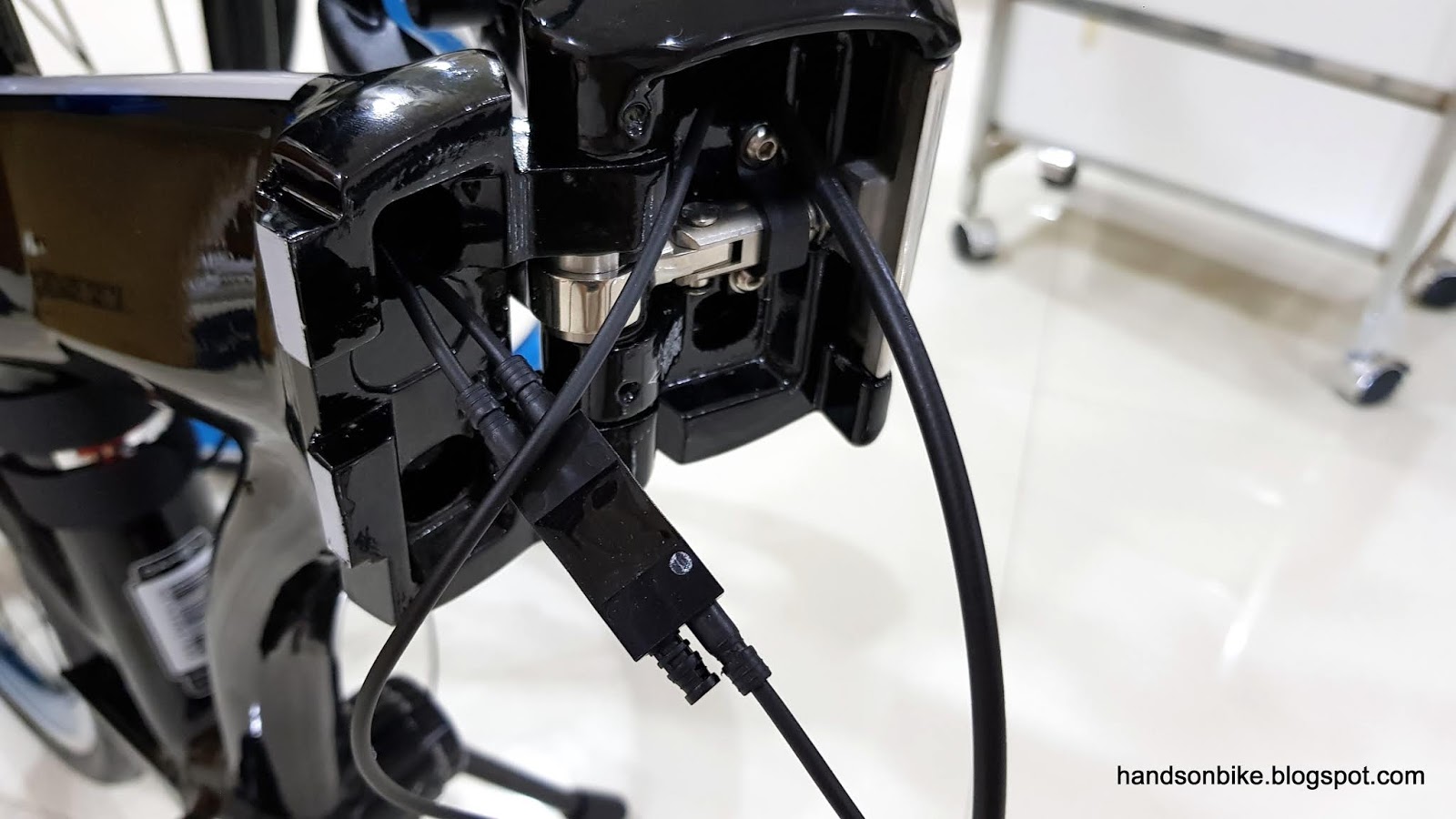
After much work, the Di2 wires can be connected at the frame joint area! The two wires from the left comes from the battery and the rear derailleur, while the one from the right is connected to the handlebar area.

Once again, the components are tested to make sure they are working at this stage. Once done, the Junction B needs to be stored inside the frame, at the rear part of the main frame (near the seat tube).

In order to prevent rattling sounds, I will need to prevent Junction B from hitting the inside of the frame. I wanted to wrap Junction B in sponge, but I found that it does not fit into the hole after wrapping it in sponge. The other way is to stuff sponge inside the frame, to act as padding along the internal walls of the frame.

Junction B inserted into the frame, in between the sponge. The brake cable will also run through this hole, beside the sponge and Junction B.

All these internal routing takes a lot of time and effort, especially since this frame is not designed for internal Di2 wiring. I would prefer not to do it again, as it is quite a lot of trouble.

More assembly to be done! To be continued in the next post.