Sunday, July 19, 2015

Difference between Ultegra 6770 Di2 and Ultegra 6870 Di2

Now that all the top end groupsets are moving towards 11 speeds, Shimano Di2 components have also been upgraded from 10 to 11 speeds. For Ultegra Di2, it has changed from the first generation 10 speed Ultegra 6770 to the latest generation of 11 speed Ultegra Di2 6870. On the Dahon Boardwalk, I have also installed Ultegra Di2 6870.

This new generation of Ultegra 6870 Di2 has been refined and improved from the previous generation of Di2 components. The main differences are in the rear derailleur and front derailleur, with only minor changes to the shifters. Let's take a closer look at the old and new Ultegra Di2 RD and FD, and see the differences and similarities.

New Ultegra Di2 6870 FD, 138 grams

 Old Ultegra Di2 6770 FD, 167 grams. Heavier by almost 30 grams.

Old FD on the left, new FD on the right. The new FD is much smaller in size!

The difference in size of the servo motor, as seen by the size of the casing

New FD is shorter and more compact

Comparing the size from the rear

Another picture comparing the size of the servo motor. This new Ultegra Di2 FD is similar in size to the Dura-Ace Di2 FD.

Some hollow rivets are used for the new FD as shown on the right side

Wire connection port on the new FD is located at a more hidden location

See the difference in the wire routing. Wire for the new FD exits at the rear, which makes it neater than the old FD.

The major difference for the Ultegra Di2 FD would be the size of the FD. This new generation of Ultegra 6870 Di2 FD is much smaller in size than the previous generation. Now, the Ultegra Di2 FD is similar in size to the Dura-Ace FD, which is great.

Another difference is the wire routing, which is neater on the new FD, as it exits at the rear-bottom, and can be well hidden by the frame. Other than these differences, the other parts of the new FD look similar to the old design.

Next, we will compare the old Ultegra Di2 6770 10 speed RD to the new Ultegra Di2 6870 11 speed RD.

New Ultegra Di2 6870 11 speed RD, 256 grams

Old Ultegra Di2 6770 10 speed RD, 272 grams.

Obvious difference in size between the new RD on the left and the old RD on the right

The servo motor on the old RD is much larger than on the new RD!

The old RD sticks out a lot more than the new RD

The limit screws have been moved from the bottom to the top of the RD 

The linkages have been changed, with the crash protection arm located at the bottom of the new RD instead of at the top for the old RD

Close up look at the crash protection arm on the new RD

For the old RD, the limit screws are located at the bottom, together with the stopper plate of the RD. 

Similar to the FD, the main difference for the RD would be the size. As seen from the pictures above, the new RD is much smaller in size than the old RD. In fact, it is similar in size to the new Dura-Ace Di2 9070 RD. All other parts look quite similar, and the wire connection port is also located at the same area on top.

In summary, for this new generation of Ultegra Di2 6870 RD and FD, the component sizes have been greatly reduced compared to the previous 6770 generation. The sizes are now very similar to the Dura-Ace Di2 9070 components, which is really good. This makes the Ultegra Di2 components a very good deal, as the performance and size is similar to Dura-Ace, and yet is available at half the price of Dura-Ace.

Difference between Ultegra 6800 and Ultegra 6700 Crankset

Now that I have both the new Ultegra 6800 11 speed crankset and the previous Ultegra 6700 10 speed crankset, I can do a detailed comparison of these two cranksets! It will be interesting to see how similar or different these cranksets are between these two generations of Ultegra cranksets.

Let's start with a weight comparison! However, it must be noted that this weight comparison is not that accurate, as the Ultegra 6800 11 speed crankset is a compact 50/34T crankset, while the Ultegra 6700 10 speed crankset is a standard 53/39T crankset. Both have 170mm crank arms.

Ultegra 6800 complete crankset, 677 grams.

Ultegra 6700 complete crankset, exactly 700 grams.

Left crank of Ultegra 6800, 197 grams.

Left crank of Ultegra 6700, 201 grams. Just a tiny bit heavier.

Right crank + chain rings of Ultegra 6800, 480 grams.

Right crank + chain rings of Ultegra 6700, 499 grams. The weight difference is probably due to the larger chainrings.

It can be seen that the Ultegra 6700 crankset is about 23 grams heavier than the Ultegra 6800 crankset. This is a relatively small difference, and is probably due to the larger chainrings on the Ultegra 6700 crankset.

Now, let's take a closer look at the left crank arm. As shown below, the Ultegra logo direction has been changed between Ultegra 6700 and 6800. On the Ultegra 6700 left crank arm, the Ultegra logo is right side up when the crank arm points backwards. However, for Ultegra 6800, the logo direction has been changed such that the logo is right side up when the crank arm points forward. The new Ultegra logo is also larger.

Difference in logo direction between the Ultegra 6700 left crankarm on top and the new Ultegra 6800 crank arm at the bottom.

The new 6800 crank arm on the right is generally wider than the previous 6700 crank arm, and yet is more lightweight.

New 6800 crank arm on the right is manufactured by bonding 2 halves of the crank arm together, as can be seen from the seam on the crank arm. Previous 6700 crank arm was forged in one piece.

Ultegra 6700 crankset on the left, new Ultegra 6800 crankset on the right. Visible difference in chain ring sizes. The Ultegra 6700 right crank arm is 5 arm and forged in one piece, while the Ultegra 6800 right crank arm is bonded with 2 pieces and is a 4 arm design.


Overall view of the 2 Ultegra cranksets. Quite different appearance, as the previous 5 arm design has been replaced by the new generation of 4 arm crank design.

Main differences:
1) Previous 5 arm design vs new 4 arm design
2) 2 piece forged + bonded construction for the new 6800 crankset, vs 1 piece forged construction for the previous 6700 crankset
3) Logo direction on the left crank arm is different

Main similarities:
1) Similar glossy grey colour and surface finishing
2) Hollowglide outer chainring
3) Similar weight (accounting for the different chain ring sizes)
4) Same hollow spindle and crank arm fixing method

The main difference would have to be the appearance, from the 5 arm design to the 4 arm design. Otherwise, the construction and the surface finishing are quite similar.

Wednesday, July 15, 2015

Journey of the Boardwalk: Part 43 - Shimano Di2 D-Fly Wireless Unit EWW01

When I ride my bike, I like to be able to know which gear I am currently riding in. For many new shifters, the optical gear display is no longer part of the shifter. The usual reason given is that the high end shifters are for the pros, and they don't need to know the selected gear. Rather, they judge by how hard they need to pedal, and change their gears accordingly.

That is true, but still, I like to know the gears, so that when I shift up or down, I know which gear I am in, and how many more gears are available. A couple of years ago, when I first installed the Ultegra 6770 Di2 system on my Dahon Boardwalk, I also installed the Alfine Di2 Digital Gear Display, which was great because it provided a nice and clear digital gear display.

However, in the recent upgrade to 11 speed Ultegra Di2, this Alfine gear display can no longer be used as it is not compatible with the other components in the setup. This means no gear display on the bike.

Luckily for me, there is actually a way to get gear display on the bike, and this requires some new add-ons to the Di2 system. Shimano has a new wireless unit, which is called D-Fly. What it does is to enable wireless transmission of Di2 gear and battery data, via ANT+ protocol. With a suitable ANT+ receiver such as the Garmin Edge 510, it would be able to receive and display the gear data from the Di2 system.

Di2 Wireless Unit for transmitting Di2 info wirelessly. Unfortunately it does not enable wireless shifting...

Very small sized, and only weighs about 5 grams.

One input and one output port. This D-Fly unit is designed to be installed in-line with the Di2 wires. This means you can install it between any two of your Di2 components.

It comes with a rubber strap to wrap the D-Fly unit around the chainstay, and it has two different rubber shims (with different curvature) to fit between the D-Fly unit and the frame.

As this D-Fly unit will be installed in between two existing components, this means that an extra Di2 wire is needed to complete the setup. Although it would allow quicker setup if the D-Fly unit comes with its own extra Di2 wire, the reason why it does not is because there is no way to determine what is a suitable Di2 wire length to include, as it depends on the frame type and the placement of the D-Fly unit. Better to let the user determine and purchase the correct length of Di2 wire separately.

Shimano recommends installing the D-Fly unit on the right side seat stay, in between Junction B and the Rear Derailleur. In actual fact, it can be installed practically anywhere in the Di2 system, in between two components. One thing to take note is that the D-Fly unit should not be installed internally in the frame, as the frame may block out too much of the wireless signal to make it usable. Again, this is not entirely impossible, just that it will take some experimentation for it to work.

I decided to get the shortest Di2 wire available, at only 150mm. The price is the same regardless of wire length.

As you can see, the wire is really very short. Useful to avoid too much slack wire hanging around.

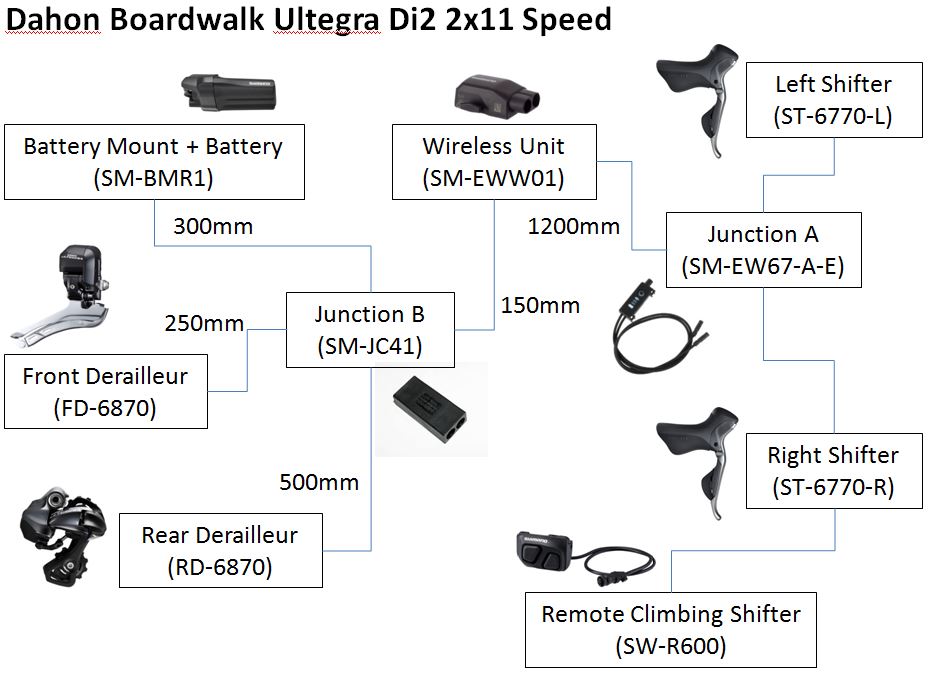
As shown below, here is a setup diagram of the 2x11 speed Ultegra Di2 system on the Dahon Boardwalk. With this graphical illustration, it should be very clear how this system is wired up. The wire lengths have also been included for reference.

Graphical representation of the Di2 wiring layout on the Dahon Boardwalk

After experimenting with a few mounting locations for the D-Fly unit, I have finally decided to mount it on the seat tube, beside Junction B as shown below. This way, it is less obtrusive and hides nicely along the frame.

Final mounting location of the D-Fly unit. Secured with a longer rubber strap as the original one is too short.

The D-Fly unit is located in between Junction A and Junction B. There is a long 1200mm wire from Junction A to D-Fly, and then a short 150mm wire from D-Fly to Junction B.

The short 150mm wire from the D-Fly unit leading into Junction B.

With the D-Fly unit connected and working properly, the gears can now be displayed on the Garmin Edge 510! Setting up the ANT+ connection was a little troublesome, but it is only a one time setup. Subsequently, the Garmin will automatically detect the Di2 data from the D-Fly unit once the first gear shift is made.

Gear display will be available when I select the Dahon bike profile, which is linked to the D-Fly unit.

The simple but great looking Di2 gear graphic found on the Garmin Edge 510. As shown above, the graphic represents the chainrings and the cassette on the bike. In this case, the selected gear is front low, and rear gear 6.

With this new D-Fly unit in the Di2 system, I have a digital gear display that I like. The gear display has essentially been incorporated into the Garmin unit, which allows the Di2 gears and the other parameters such as speed and distance to be displayed all on the same screen. This also saves space on the handlebar.

Other than showing the gear position, it also logs the selected gears with respect to time. This means that for cycling videos with Garmin data, it will be possible to display Di2 gears on the video overlay. Here is an example from another user.

Another small benefit is that the Di2 battery level can also be displayed, making it easy to check the battery level.

With this addition, the Di2 system upgrade is complete! 2x11 speed Ultegra Di2, with wireless gear display is definitely overkill on most bikes, especially for the humble Dahon Boardwalk. I am so glad to have had the chance to upgrade this bike for as far as this.

What's next?

Wednesday, July 8, 2015

Journey of the Boardwalk: Part 42 - Installing 11 Speed Ultegra Di2

It is now time to upgrade the Dahon Boardwalk to 11 speeds! As shown in the previous post, all the components for Ultegra 11 speed Di2 have been prepared and are now ready to be installed on the bike.

Before that, it is necessary to update all the firmware on the different components, so that they all have the latest firmware version in order to function properly as an 11 speed system. Also, we need to check the compatibility of all the different Di2 components. Although the E-Tube system has already allowed a wide variety of Di2 components to be used with each other, we still need to check compatibility. A compatibility table from Shimano has been provided below for checking of Di2 compatibility.

Compatibility table for a Road Di2 setup

As shown from the table above, I can only have one Junction A for the Di2 system. If you remember, for my current setup (10 speed Ultegra Di2), I actually have both the Ultegra 6770 Junction A (EW67) and the Alfine Di2 digital gear display (SC-S705) installed on the Dahon Boardwalk.

In the older firmware versions, this was an unofficial setup that just happened to work. Although it was sometimes buggy (display did not turn on sometimes), it worked pretty well as it gave a nice gear display. Under the latest firmware version, this would count as two Junction A and will not work.

For this 11 speed setup, I will need to update the firmware for the whole Di2 system. This would cause the old setup to stop working, as there will be two Junction A in the system. This means that I have to remove one of the Junction A.

Although the Alfine Di2 gear display is more useful, I have to use the EW67 Junction A as it has the two wires that are necessary to connect to the two road Di2 shifters. The Alfine Di2 gear display only has one input and one output and thus is not compatible with two Di2 shifters.

Current 10 speed Di2 setup, with the Alfine Di2 gear display mounted on the centre of the handlebar

Current setup, with the Garmin Edge 510 and Shimano Sport Camera mounted out front

Before I can update the firmware on the bike, I will need to wire up the entire system, so that I can update the whole system together. As I will continue to use the Ultegra 6770 Di2 shifters and the existing Di2 wiring which are already on the bike, this means that I will need to install the new 11 speed components onto the bike, before I update all the Di2 components at one go.

First, the old 10 speed Ultegra components are removed from the bike. This includes the 10 speed Ultegra 6770 Di2 RD, FD, chain and crankset.

RD, FD, chain and crankset removed from the bike

This Chris King R45 rear hub is 11 speed compatible, but because a 10 speed Shimano road cassette was installed, 2 spacers (1.85mm + 1mm) were on the freehub body.

The 11 speed Dura-Ace 9000 11-25T cassette will go straight onto the Chris King rear hub. No spacers required.

While installing the 11 speed Ultegra Di2 FD, I had an unexpected problem with the axle of the FD rubbing the LitePro FD adapter. This would sometimes prevent the FD from moving smoothly as the axle is too close to the adapter.

Axle of FD is rubbing against the FD adapter

I tried the FD adapter from another brand. Similar design, but it has just a little bit more clearance from the axle on the FD.

Ultegra Di2 FD installed onto the bike, with the new FD adapter. Small clearance between the axle on the FD and the adapter arm.

With the new 11 speed Ultegra Di2 RD and FD installed on the bike. After wiring up all the components, I can now update the firmware for the whole Di2 system.

Connected the Di2 system to the PC Linkage Device, which is then connected to the computer.

Before updating the individual components, the battery mount will automatically be updated first. For more information on updating the Di2 firmware, refer to this earlier post.

Next, the individual components will be identified, and those that need to be updated will be highlighted in yellow. Basically everything needs to be updated as it has been more than 2 years since I last updated the firmware.

All the Di2 components being updated one by one with the latest firmware

Glad to see that after all the updating is done, all the components are working normally! It is now possible to shift the new 11 speed Di2 RD and FD with the older Ultegra 6770 shifters. Another benefit of the new 11 speed Ultegra FD is that I can adjust the shifting stroke of the FD, similar to adjusting the cable tension of the FD inner cable. It was not possible to adjust this for the previous generation of Ultegra 6770 Di2 FD.

New Ultegra 6870 11 speed Di2 FD mounted on the bike. Looks much smaller than the previous Ultegra 6770 version! Wire exit is also nicely hidden at the rear.

Shiny new Ultegra 6870 11 speed Di2 RD. Also much smaller in size than the previous Ultegra 6770 10 speed version.

11 speed cassette, with a 11-25T cassette combination.

Ultegra 6800 compact crankset, 50/34T chainrings, taken from the Merida Scultura 5000.

A new 11 speed chain needs to be used for this new 11 speed drivetrain. The gear combination has also been changed from a largest combination of 53 front/27 rear to 50 front/25 rear, which means a shorter chain can be used.

The new Ultegra 6800/6870 drivetrain! With the 4 arm Ultegra crankset and the new 11 speed Ultegra Di2 RD and FD. Shifters are still the same Ultegra 6770 Di2 shifters, reprogrammed for 11 speed components.

Full view of the newly upgraded 11 speed Ultegra Di2 Dahon Boardwalk! 

It is great to finally complete upgrading the Dahon Boardwalk with the new 11 speed Ultegra Di2 components. Functionally speaking, there is no big difference in shifting performance between the 10 speed and the 11 speed Ultegra Di2 components.

However, from an aesthetic point of view, the smaller Ultegra 6870 RD and FD is a big difference from the bulky Ultegra 6770 RD and FD. Also, the 4 arm crankset gives a different image from the older 5 arm crankset design.

Most importantly, this latest upgrade frees up the 10 speed Ultegra 6770 RD and FD for another bike, another project!