Saturday, December 13, 2014

Merida Scultura 5000 - Dura-Ace 9000 Bottom Bracket and Chain

More upgrades for the Merida road bike! I have enjoyed riding this road bike, and also look forward to upgrading some of the components. Most of the stock components work well and there is actually no strong reason to upgrade them.

However, I do like to upgrade components for the sake of upgrading. During the upgrading process, I can learn more about the component and also compare the old and new components to see the differences. A bonus side effect is that it can improve the performance, enhance the appearance of the bike and hopefully reduce the weight as well.

Today, the upgrade will be for the Bottom Bracket (BB) and the chain. These are relatively cheap components of the drivetrain, but they are definitely critical. Without the BB or chain, there will be no drivetrain.

The Merida Scultura 5000 comes stock with a Shimano Tiagra 4600 bottom bracket, which is a no-frills Hollowtech II road BB. There is nothing wrong with it, but I would like to change it for a more high end BB.

This road bike comes with mostly Ultegra components, but the BB is not one of them. In this case, I will upgrade the BB to the latest Dura-Ace 9000 BB. The BB is the most affordable Dura-Ace component, and it is smaller in size, more lightweight and has 50% less rotational resistance than the previous Dura-Ace 7900 generation.

Dura-Ace 9000 Bottom Bracket, 68mm.

Due to the smaller outside diameter of the newer BB bearing cups. an adapter is needed if you want to use standard Hollowtech II tools.

This resin adaptor comes packaged together with the Dura-Ace BB.

Comparing the Tiagra BB with the Dura-Ace BB. The outside diameter is an obvious difference. The inside diameter for the crank spindle is the same 24mm, so it can be used for any road Hollowtech II cranksets.

Same length, but different bearing sizes and diameter.

Tiagra SM-BB4600 weighs 90 grams...

...while the new Dura-Ace 9000 BB weighs less at 64 grams. A small weight saving of 26 grams.

Crankset and old BB already removed, and BB shell threads cleaned in preparation for installation of new BB.

Holes inside the BB shell. This will allow internal routing of cables if required. The RD cable is actually routed above this opening in the BB shell, and can be accessed through the holes you see in this picture.

The standard Hollowtech II BB tool is too big for the smaller Dura-Ace 9000 BB cups

Use the included BB adapter to change the outside diameter of the BB cup to the standard size...

...and the standard BB tool will fit nicely! Installation is straightforward without any problems.

New Dura-Ace BB looks really small compared to the large BB shell on the frame

New Dura-Ace 9000 BB is ready to receive a crankset!

Note:
There are currently 3 different bearing cup sizes for road Hollowtech II BB. There is the standard size which is used for Dura-Ace 7800/7900, Ultegra 6600/6700, Shimano 105 5600/5700. This can be installed or removed using the standard Hollowtech II BB tool.

Then there is the Dura-Ace 9000 size, which has the smallest bearing cups as you can see here. It comes with a resin adapter so that you can use the standard tool for installation or removal.

Now, there is also a third size, which is used for the new Ultegra 6800 and Shimano 105 5800. This BB model is SM-BBR60. It is larger than the Dura-Ace 9000 BB, and yet is smaller than the previous generation of BB. Therefore it also comes with its own adaptor for compatibility with standard Hollowtech II BB tools.

Other than the BB, I also took the opportunity to change the chain. The chain that came stock with the Merida bike is a Shimano 105 5800 11 speed chain. No problems with it, but I would like to use a Dura-Ace chain due to its superior rust resistance. I am also using the 10 speed Dura-Ace 7900 chain on my other folding bikes, the Dahon Boardwalk, Dahon Vitesse and Dahon MuEX.

Dura-Ace 9000 11 speed chain. Not too expensive if you get it online.

Just weighing it for reference. Not expecting to get any weight savings from changing the chain.

Used a KMC MissingLink to join this new chain together, without using the chain pin.

For 11 speed chains, the KMC MissingLink cannot be reused (as recommended), and it is too tight to remove by hand. This eliminates a lot of the advantages of having a KMC MissingLink, as it means that it cannot be removed as easily, and it should not be removed for chain cleaning (unless you are willing to replace the MissingLink with a new one).

Still, I decided to use the MissingLink as it allows the chain to be joined or disconnected easily (with the use of the MissingLink pliers), and it also gives a good reference point for lubing the chain.

New Dura-Ace 9000 chain. Hollow chain pins are there to give a little bit of weight reduction.

With a gold coloured KMC MissingLink, it is easily visible on the chain. A silver version is also available.

New chain on the bike...guess what upgrade is coming up next?

After installing the new BB and chain, the bike upgrade is well underway! My aim is to give the bike a full Ultegra groupset, and there are still a couple of parts that are not Ultegra grade yet. More to come in the next few posts!

Selle Italia SLR Kit Carbonio Flow Saddle

This will be the start of a few posts about weight reduction for my Merida Scultura 5000 road bike. I have already identified some components and areas where significant weight savings can be made, and will be changing those components.

In a previous post, I had actually already changed the stock Merida saddle to a Selle Italia SLS Kit Carbonio Flow saddle. That shaved about 100 grams off the original saddle weight. However, after that I found another saddle that was even more lightweight and still looked comfortable enough. What saddle is it? Let's find out!

Another Selle Italia saddle, with a rather large packaging

Selle Italia SLR Kit Carbonio Flow. This is a top end saddle that is super lightweight and also rather expensive.

Super lightweight at only 121 grams! Almost the same as the 120 grams that is stated on the packaging.

Looks very race oriented with a nice cutout in the middle to eliminate any numbness

Flat profile with a minimalist construction to minimise weight

Rear of the saddle is wide enough to be comfortable

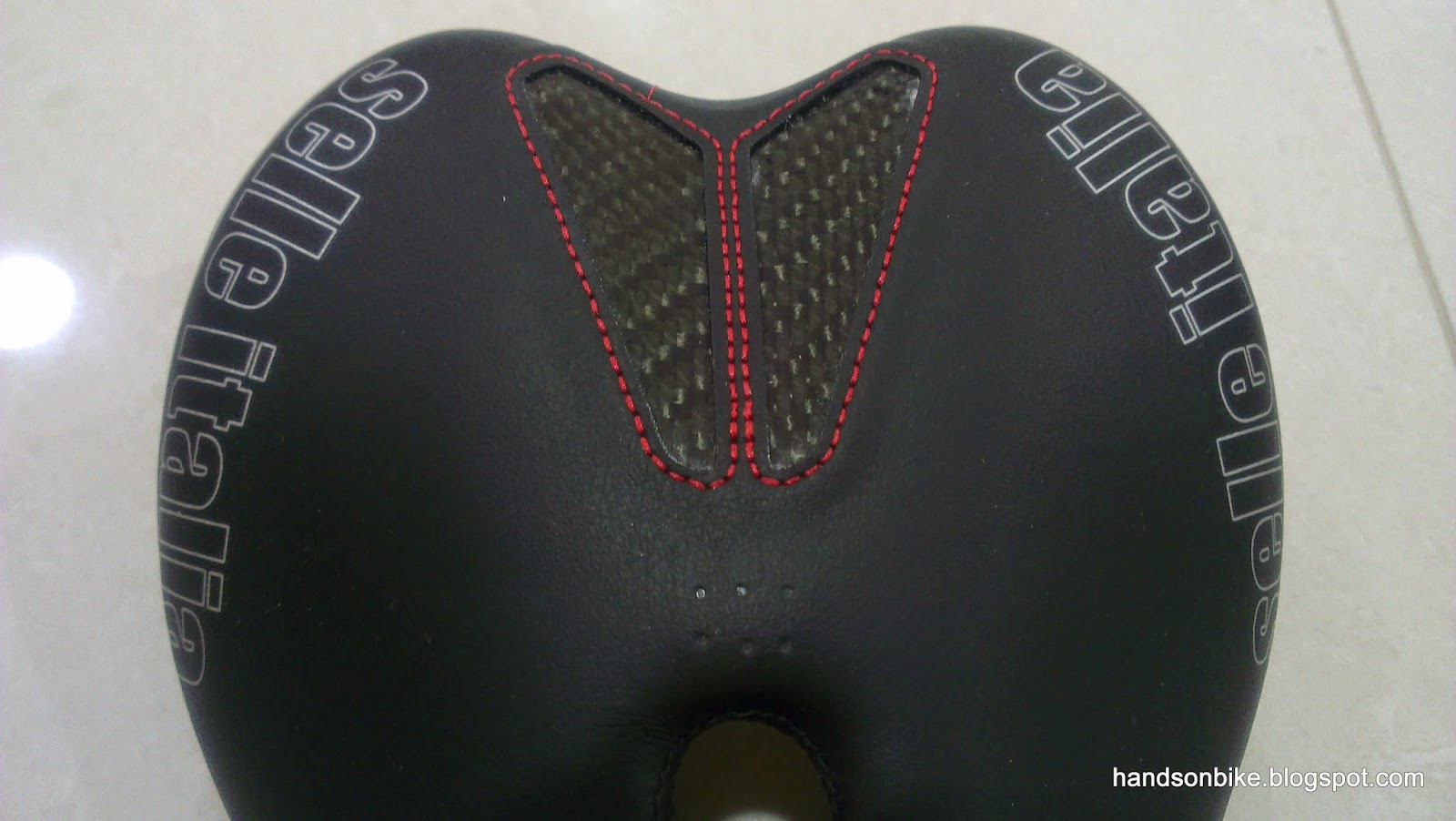
Transparent cutouts at the rear of the saddle exposes the carbon fibre weave underneath

SLR logo printed at the sides of the saddle

Bio Fit Foam is used in the saddle. It is designed to slowly mold itself over time and fit your sit bones for better comfort.

SLR logo also printed on the nose of the saddle

The top and sides of this saddle looks rather normal, with nothing too special about it. However, the saddle rails is where it gets interesting, and you can tell that it is more expensive and more lightweight than other saddles.

Saddle rails are made of some sort of Carbokeramic material for strength. I think these carbon saddle rails are even lighter in weight than hollow titanium saddle rails.

Carbon saddle rails are specially shaped and designed. Made in Italy.

See how both sides of the carbon saddle rails merge together near the nose of the saddle. A special design that is radically different from standard metal saddle rails.

These carbon saddle rails are not recommended for use on some seatpost clamp designs. Click on the picture to get a clearer view.

Rather limited saddle fore/aft adjustment range due to the wide seatpost clamp required and the short clamping area on the saddle rails.

Prior to ordering this saddle, I did not know about the restriction on the type of seatpost clamps that can be used with these saddle rails. These restrictions and recommendations are not clearly stated anywhere when ordering, except for in the product manual when you have already received the saddle.

I was rather fortunate that the stock seatpost of the Merida road bike is suitable for use, as it is of the recommended design. The required clamp width needs to be at least 30mm wide with at least 16mm of clamping length.

This seatpost clamp is OK! 32mm total clamping width and 2 x 9mm of clamping length.

Comparing the new saddle and the stock Merida saddle side by side. This new Selle Italia saddle saves 215 grams over the stock Merida saddle which weighs 336 grams.

The centre cutout is surprisingly useful as it allows easy adjustment of the saddle tilt angle, by allowing access to the hidden clamp bolt.

Seen as mounted on the stock Merida seatpost

Very slim and sleek side profile!

Top view of the Selle Italia SLR Carbonio Flow Saddle

Overall view of how the new saddle looks when set against the other parts of the bike

I have tried this saddle for more than a month, and I am very happy with this saddle. Although the foam cushioning is thin, it still feels comfortable as the whole shell can flex to absorb bumps. Of course, I was mostly using my cycling pants with padding so that definitely helps.

Comparing it with the cheaper and heavier SLS Kit Carbonio Flow saddle, I can hardly tell the difference in comfort as both feel comfortable.

Pros:
1) Super lightweight at only 121 grams
2) Comfortable despite the thin cushioning (provided you are wearing cycling pants with padding)

Cons:
1) Expensive
2) Limited compatibility with seatpost clamps

For a saddle, the only features that I look for would be lightweight and comfort. As long as these two can be satisfied, it is a good saddle. For many saddles out there, they are either lightweight or comfortable, but not both. This Selle Italia SLR Kit Carbonio Flow saddle manages to be both lightweight and also comfortable, which makes it an amazing saddle!

Of course, these features come at a cost as it is expensive (USD 180). Also, it will not be compatible with many lightweight seatposts, which limits its use.

In summary, this is a good saddle that is perfect for weight weenies, without sacrificing too much comfort. The downside would be the high cost and the limited compatibility with seatpost clamps. It is best to check compatibility before getting this saddle to avoid any installation or safety issues.

Sunday, December 7, 2014

Fly 6 Rear Camera + Rear Light (2nd Generation) - First Impressions

Nowadays, dashboard cameras are becoming more and more popular in vehicles, with the purpose of recording the event if an accident happens. With video evidence, it is difficult to dispute any claims as it is no longer your words against the other persons', but is based on facts shown in the video footage.

With the same idea in mind, Fly 6 launched their rear video camera + rear light earlier this year for use on bicycles. Although it was not cheap, for this price you actually get a rear video camera and a rear light, so it is still reasonable. The main draw for this device is that both the video camera and the rear light are integrated as one unit, so only one mounting is required. Also, it has a looping video function which means that there is no need to clear the memory card manually when the memory card is full. This works the same way as dashboard cameras in vehicles.

In October this year, I came across a pre-order for the 2nd generation of the Fly 6! This second generation Fly 6 is smaller in size than the first generation design, which is really good. I decided to order it to try it out. Together with the Shimano Sport Camera at the front, it gives me front and back video coverage if desired.

The estimated delivery date for the 2nd Gen Fly 6 is in Dec 2014, so I was actually expecting it to come early next year as the actual delivery date usually gets pushed back due to various issues. Thus I was pleasantly surprised when I received the Fly 6 in the first week of December! It is great when the actual delivery date can meet the promised/estimated delivery date.

Enough of my rambling, let's take a look at the new 2nd Gen Fly 6!

Comes in a pretty and nicely designed box. It has the same high quality feeling as when I received the Blaze Laser Bike Light.
What's printed at the bottom of the box. Features of this rear video camera + rear light.

Includes lots of mounts and even the MicroSD card. 8 GB of memory card storage can provide 2 hours of looping HD footage.

The technical specifications of this device

First thing you see when the box is opened. The quick start guide for this device.

I resisted the urge to open up the rest of the box, and took a look at the guide first. All these parts are included in this box!

Name of the various parts of this device

To attach or remove the Fly 6 from the mount, just slide it out from the plastic mount.

Power button turns On/Off the Fly 6, and also cycles through the various lighting modes. The courtesy dimmer button on the other side adjusts the brightness in each mode.

To prevent overwriting too much of the video footage iif an accident occurs, there is an incident capture mode. When this mode is activated, it records for one more hour before stopping. This ensures that you have the video recording of one hour before and one hour after the incident.

There is no visual battery level indicator, so the Fly 6 uses audible beeps to let you know how much battery charge is left.

Comes with some stickers if you wish to decorate your bike

What you see after removing the guide and the stickers from the top of the box

The full array of accessories and mounts for the Fly 6!

Lots of mounts provided. Sufficient for mounting on two bikes!

The plastic mount where the Fly 6 will slide onto. This mount is then attached to the bike using the rubber straps.

There are rubber wedges of different angles, in order to help you align the Fly 6 such that it points horizontally backwards. What you see here are the 5 degree and 10 degree rubber wedges.

The special wedge that is used for mounting on aero seatposts that are not cylindrical in shape.

Finally, the Fly 6 itself! Does not look that big in this picture...

First, a size comparison. Once again, I used the commonly seen Smart 0.5 watt rear light for comparison. Can see that the Fly 6 is quite a bit taller, but is the same width.

The Fly 6 is quite a bit thicker than the Smart rear light. However, when the Smart rear light is mounted using its plastic mount. both will stick out from the seatpost by about the same amount.

This comparison will not be complete without a size comparison with the first generation of the Fly 6! One of the main selling point of the 2nd Gen Fly 6 is the smaller size compared to the 1st Gen Fly 6. I would not have bought the 1st Gen Fly 6 as it was just too tall and bulky.

From left to right, the 1st Gen Fly 6, 2nd Gen Fly 6 and the Smart rear light. The 2nd Gen Fly 6 is about 2cm shorter than the 1st Gen Fly 6.

2nd Gen Fly 6 is a little thicker than the 1st Gen Fly 6.

1st Gen Fly 6 without mount, 107 grams

1st Gen Fly 6 including mount, 133 grams. Quite lightweight, considering that it is both a video camera and a rear light!

2nd Gen Fly 6. Slightly heavier than the 1st Gen Fly 6 by 8 grams.

Including the mount, the 2nd Gen Fly 6 weighs 141 grams. Heavier than the 1st Gen Fly 6.

According to the technical specifications from the Fly 6 website, the 1st Gen Fly 6 has a 1500 mAh battery, with 5 hour runtime and 15 lumens from the rear light. With the new 2nd Gen Fly 6, the battery capacity has been increased significantly to 2600 mAh, with 6 hour runtime and up to 30 lumens from the rear light.

This is the main reason for the slight increase in weight. It is a good tradeoff as I don't mind bringing along 8 grams more, for longer runtimes and a brighter rear light.

Close up look at the 1st and 2nd Gen Fly 6.

1st Gen Fly 6 has the Mini USB charging port and the MicroSD card slot at the bottom of the device, and is covered by a rubber flap. Some people have commented that this makes it more prone to water ingress and that the MicroSD card can drop out if the rubber flap opens up.

The 2nd Gen Fly 6 has improved on this, by moving the Micro USB charging port and the Micro SD card slot to the side. This should make it more waterproof and the rubber cover less prone to opening up.

View of the rear. Looks similar except for the size.

View of the front. The area around the camera lens and LEDs have been changed from the 1st Gen to the 2nd Gen Fly 6.

In the 1st Gen Fly 6, the LEDs around the camera lens are housed within the same compartment of the casing, with a chrome backing.

When the Fly 6 is turned on, there will be a rotating ring of LEDs around the camera lens. At night, this is visible on the video as a rotating ring which can be rather annoying. The rotating ring of light cannot be turned off.


In the 2nd Gen Fly 6, the rotating ring of LEDs are still there. However, they are located further behind the camera lens, and in a separate compartment.

With the rotating ring of lights located further back from the camera lens, it should solve the problem of a visible ring of light in the video footage. This will be known once I get some night video footage.

On the left side of the Fly 6 is the Power button which also functions as the mode button.

On the right side of the Fly 6 is the dimmer button which is used to adjust the brightness of the LEDs in each of the lighting modes.

What is very different about this light is that you can adjust the lighting mode and the brightness independently. Normally, on most other lights, different brightness of the light count as different modes. However, for this Fly 6, lighting mode and brightness are controlled separately, giving you a high level of customisation.

Mode 1: Strobe light alternating with flashing red LEDs (similar to Smart rear light flashing pattern)
Mode 2: Strobe LED and red LEDs all flash at the same time
Mode 3: Constant mode

In each of these 3 modes, there are 4 levels of brightness. High, medium, low and off. In the off mode, only the rotating ring of lights around the camera lens are still on, the strobe and red LEDs are all off. All the 3 modes show the same thing (rotating ring) when in the lowest level of brightness.

This gives a total of 10 unique settings, with different lighting patterns and levels of brightness. Very useful and customisable to suit everyone's preference.

My favourite mode is Mode 1 with a medium level of brightness, as this flashing pattern is the most visible, and the high brightness mode is actually too bright.


Lowest brightness mode, with only the rotating ring of lights still activated.

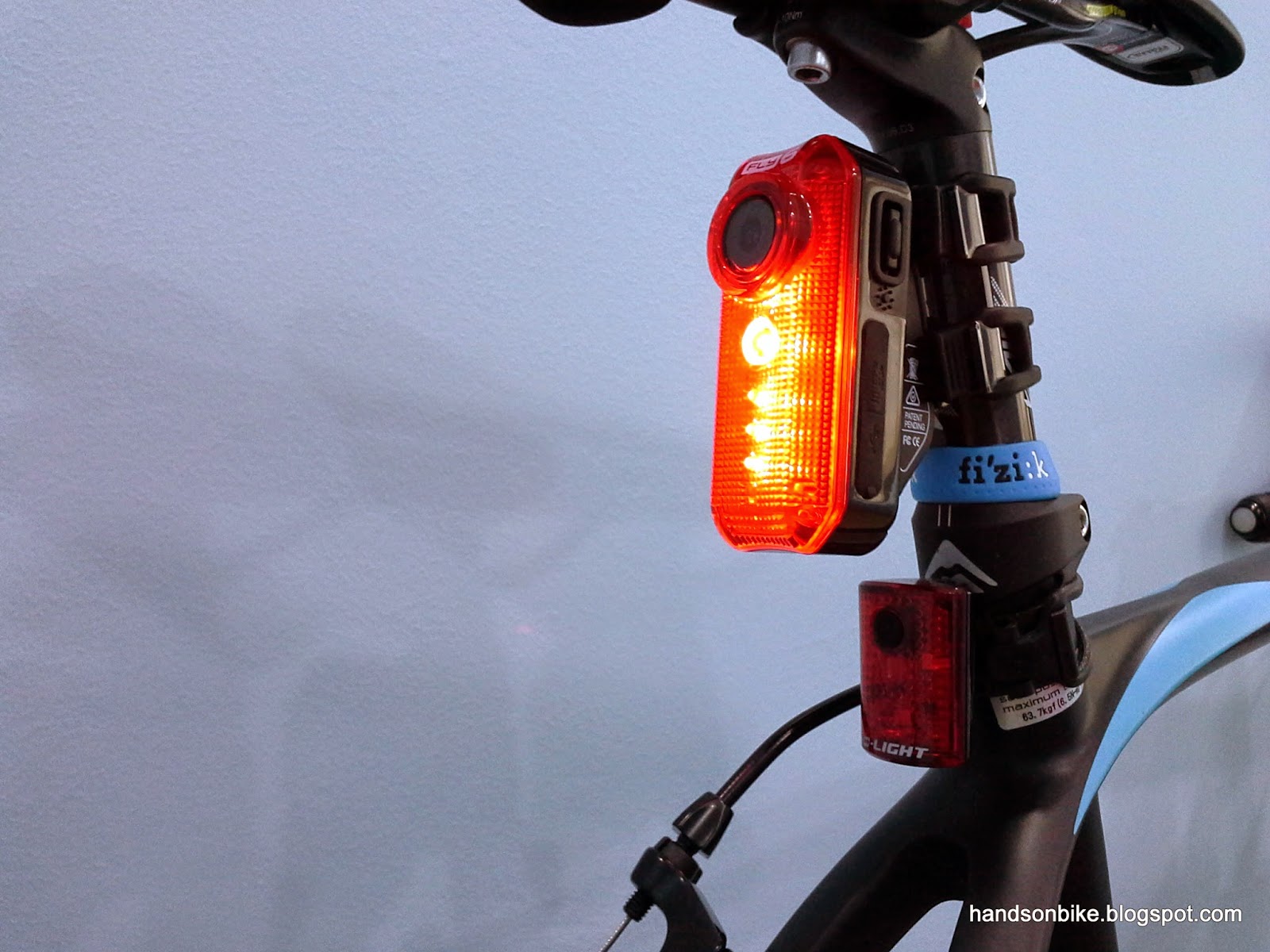
How it looks when mounted on the seat post. Looks so much bigger than the D-Light Rear Light!

Still sticks out quite a lot from the seat post, which is what I don't really like. Also, I can only use either the Fly 6 or the Topeak RedLite Aero Rear Light at any one time.

Overall look of the Fly 2 (2nd Gen) mounted on the Merida road bike. Still very bulky compared to a normal rear light.

I guess it is not possible to have a rear video camera + rear light that is also compact sized. Although this new 2nd Gen Fly 6 is already smaller than the 1st Gen, it still looks bulky when mounted on a road bike.

Still, having a rear video cam is more important than having a slim looking seatpost. If the benefits outweigh the disadvantages, it will be a good tradeoff. On its own, the video camera on the Fly 6 is actually a pretty decent one. Also, it is an excellent rear light that is better than most rear lights available in the market.

Will be trying out the new Fly 6 on rides soon, and hopefully there will be more to write about after I get to use it more!